

If HIFIS doesn’t have a spot for you to easily record what you want to record, there’s an obvious solution: add a Custom Table! But is that the right solution? Maybe. Or maybe not.
What is a Custom Table?
A Custom Table is a series of custom fields, that looks like a form, that you can design yourself. It’s then attached to another record, so you can think of it as a way to expand another module. This is most usefully explained with an example.
Let's imagine you want to use the Case Management module. You know you'll be doing so, but one thing that is missing from it is a way to capture a case plan. You can create a custom table called "Case Plan" and attach it to the Case Management module. It adds extra fields that are effectively attached to the Case file.
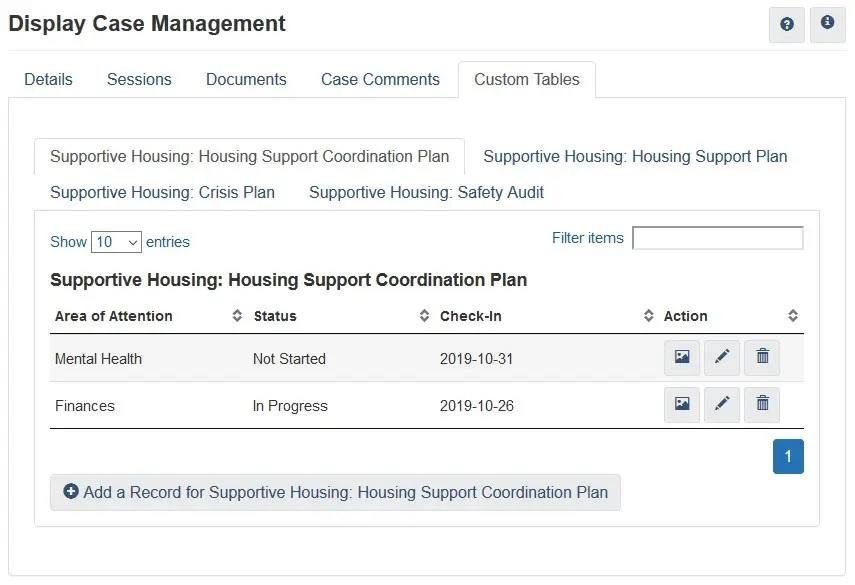
Case Management Custom Tables
In the image above, the Case File actually has four different Custom Tables attached to it: a Housing Support Coordination Plan, a Housing Support Plan, a Crisis Plan, and a Safety Audit. These could all be thought of as extra data that is or can be attached to an existing Case File.
But Case Management is not the only place that Custom Tables can be added. You can add a Custom Table to nearly any module, including Incidents, Admissions, Goods & Services, Housing Units, Service Providers, and Client Details.
When is it a good idea to add a Custom Table?
It’s generally a good idea to add a Custom Table when all of the following are true:
-
You’re trying to collect a piece of data that there literally isn’t a place in HIFIS to collect. For example, Sexual Orientation or Landlord Engagement.
-
The module you want to extent with a Custom Table displays the Custom Table conveniently. (Not sure what I mean by that? Case Management and Client Details are good. Go add Custom Table to Turnaways or Goods & Services and then try to add data to it.) Not all modules that can host a Custom Table are good at hosting a Custom Table.
-
Your overall data quality is pretty good. Your staff are collecting data reliably and entering what they’re supposed to, and you can generally rely on your HIFIS data to answer your questions about homelessness in the community.
-
You are able to take ownership and support users as you begin to use HIFIS off-script. You’ll need to train them on something that there isn’t training available for, it’ll be harder for you to find existing reports that meet your needs, and there could be unforeseen future complications resulting from new HIFIS software updates that didn’t take into account your specific Custom Table.
When is it a bad idea to add a Custom Table?
It’s probably less of a good idea to add a Custom Tables if any of the following are true:
-
You’re going to be requiring people to double-enter something. For example, if you’re requiring staff to update the Housing History of clients (which you should be doing, all the time, for every program), don’t also have a Custom Table asking how long someone’s been homeless for. Or, if you’re requiring staff to complete the VI-SPDAT, don’t add a Custom Table that asks about tri-morbidity.
-
Why not? Making staff double-enter data is never a good idea. It takes twice as long to do that, and so think about what is being sacrificed here. Do you want staff to spend less time with clients, so that they can do redundant data entry? If you expect them to maintain the same number of hours with clients, then they’re still going to have the same amount of time for data entry, and they won’t be able to record everything you want. The data will be spotty and incomplete. The sacrificed data quality might not be specifically related to the Custom Table, though - it might mean sparser case notes or a delay in booking clients into and out of shelters or forgetting to attach documentation.
-
-
HIFIS already has a spot for you to collect the data, but you just don’t like that spot. For example, don’t create a Custom Table to collect income-related information since HIFIS already has an Income module.
-
Why not? You’re sort of painting yourself into a corner. Existing reports (and hypothetical future reports) will assume you entered the data in the built-in spot, and they’ll show a big fat zero for your data. If the module is so bad that you’d rather use a custom table, tell the HIFIS Client Support Centre. Chances are someone else thinks the same thing, and your concern can be addressed in a newer version of HIFIS. There could even be future updates to HIFIS that reference the module you are eschewing (for example, the Diversion Workflow includes data from the Income module) that you’ll miss out on because all your data is in the wrong place.
-
-
You’re just at the beginning of your HIFIS implementation journey.
-
Why not? You should probably get a handle on how HIFIS is supposed to work before you start going off script. If you’re just at the beginning, you probably don’t know yet what the impacts of your potential configuration decisions might be, and so it’s good to start with using HIFIS as expected. This is the lowest risk approach.
-
-
You’re adding a Custom Table just to convince some cranky service provider to finally start using HIFIS.
-
Why not? Allowing exceptions to standardized data entry for some providers is generally a recipe to have bad data. You start with a one-time thing here or there, and the exceptions start to grow and grow, and then you have multiple similar programs with wildly different methods for HIFIS use. In a few years, you’ll likely regret the decision and then struggle with how to fix it, because all their historical data is stored in a Custom Table you don’t want them using anymore. It also gives the impression that if they don’t like your data entry requirements, they don’t have to follow them.
-
-
You haven’t really tested the Custom Table, or you just thought of the idea today.
-
Why not? Trust us when we say, test it first. Add the Custom Table to your test site first (or to demo.hifis.ca) and then pretend you’re an end user and try actually adding data the way you’ll be asking them to do so. Sometimes it might sound like a great idea on paper, but when you try it out, it’s super clunky. Sometimes you have a Custom Table designed, but some of your fields are the wrong format (e.g. Single-select versus multi-select. Boolean versus datestamp. One record versus multiple records.). Go through a few iterations of testing and see what works best.
-
-
You haven’t set aside resources for custom reporting.
-
Why not? Asking staff to put information into HIFIS and then not allowing them to have access to the data is not a recipe for success. They’ll call HIFIS a black box that they put data into but never get anything out of, and your data quality will fall.
-
Examples of Custom Tables
With that in mind, there are some Custom Tables we’ve seen pop up over and over again in lots of different communities. Here, we’re going to give you some examples of Custom Tables that work well.
-
Housing Needs and Preferences. For example, how many bedrooms they need, what’s their maximum rent, do they need an accessible unit, and so on. This is a great option to attach to a Housing Placement. (By the way, we’re hoping this will be added to HIFIS via our HIFIS Improvement Project: Housing Matching, but that’s a ways off.)
-
Case Planning. This can describe a few different things, including a safety plan, a housing plan, or just generally planning for case management. This has a higher degree of variability since different programs do case planning differently, but should generally be attached to Case Management.
Some communities attach a Custom Table to their Client Details to collect additional information about a client that they then typically might use for prioritization purposes. Be careful with this one, it’s not always a good idea. You have to make sure you’re avoiding the pitfalls of Custom Tables mentioned above. Make sure you’re not requiring someone to double-enter data, and make sure you’re not inadvertently sacrificing data completeness in other modules where data is expected to go.
You can also add really specific Custom Tables for certain data points. We’ve blogged about some in the past, like:
-
Fun with Custom Tables: Landlord Engagement - attaching a Custom Table to a People (landlord) record to keep notes about your interactions with them.
-
Fun with Custom Tables: Consent - uploading external consents that don’t have to do with HIFIS service providers.
-
How to Record a Client's Support Network in HIFIS 4 - so this one breaks our own rules. There is a Contacts module, but nobody likes it. In this case, using a Custom Table might be a better solution.
-
How to Record Sexual Orientation in HIFIS 4 - you could record a client’s sexual orientation as a Contributing Factor, but that doesn’t always make sense.
What else should I know about Custom Tables?
The most important things that you should know about using Custom Tables are the following.
First, you’re not going to be able to pull data out of your Custom Table (in terms of reporting) without a custom report. If your table was just to provide information for a caseworker, like in How to Record a Client's Support Network in HIFIS 4, you may not need a report for that. But if you wanted to add a custom table for, say, use in a prioritization report, you’ll need a custom report that pulls data from the right source. (As someone who writes these reports, let me tell you that reports referencing Custom Tables usually take two or three times as much time to troubleshoot as ones that do not.)
Building a report using Custom Tables?
Our Data Wrangling Project can make things easier for you!
Custom Tables (Client Vitals) Dataset Custom Tables (Case Management) Dataset
Second, you could potentially be impacting your data quality in other areas. Adding a Custom Table in one place is probably going to discourage people from going somewhere else and entering data there. Sometimes, that’s a good thing. Other times, not so much. Consider carefully questions like: How long will it take for staff to use the Custom Table? Is this going to make the software easier or harder to use? What could go wrong with this approach?
Finally, try to think in the long term. Introducing a Custom Table to fix a short-term problem might sound like a good idea at the time, but when the short-term problem is addressed, what will be the plan to decommission the Custom Table? How will staff retain access to the data they entered, without encouraging them to keep entering data in the Custom Table forever? If you are fine with using the Custom Table forever, okay. But if you’re not, you need to have an exit strategy in mind.
In general, adding a Custom Table isn’t a decision to be made lightly. If you think through the pros and cons and decide it’s a good idea, by all means, proceed. Just don’t rush into it.
Custom Tables Review
Want ACRE Consulting to review your Custom Tables configuration and provide specific, actionable feedback?

Comments